
1.8 KiB
1.8 KiB
slug, title, description, toc, authors, tags, categories, series, date, lastmod, featuredVideo, featuredImage, draft, enableComment
| slug | title | description | toc | authors | tags | categories | series | date | lastmod | featuredVideo | featuredImage | draft | enableComment | ||||
|---|---|---|---|---|---|---|---|---|---|---|---|---|---|---|---|---|---|
| 用 oh-my-posh 美化 Git bash | 用 oh-my-posh 美化 Git bash | true |
|
|
|
|
2022-06-14T00:00:00 | 2022-06-14T00:00:00 | false | true |
讓 Windows Terminal 中的 Git bash 也可以美美的。
步驟
以下步驟都是在 Windows Terminal 中的 Git bash1 執行。
- 先下載一個你喜歡的theme: https://ohmyposh.dev/docs/themes
- 下載並安裝字型:Caskaydia Cove Nerd Font
- Install OhMyPosh:
winget install JanDeDobbeleer.OhMyPosh - 建立並修改
~/.profile,然後加入
eval "$(oh-my-posh --init --shell bash --config ~/OneDrive/appConfigs/ohmyposh/themes/montys.omp.json)"
注意最後的montys.omp.json就是第一步下載的theme,這邊要改成你自己的路徑。 - 修改 Windows Terminal 的
setting.json,將字型改為CaskaydiaCove NF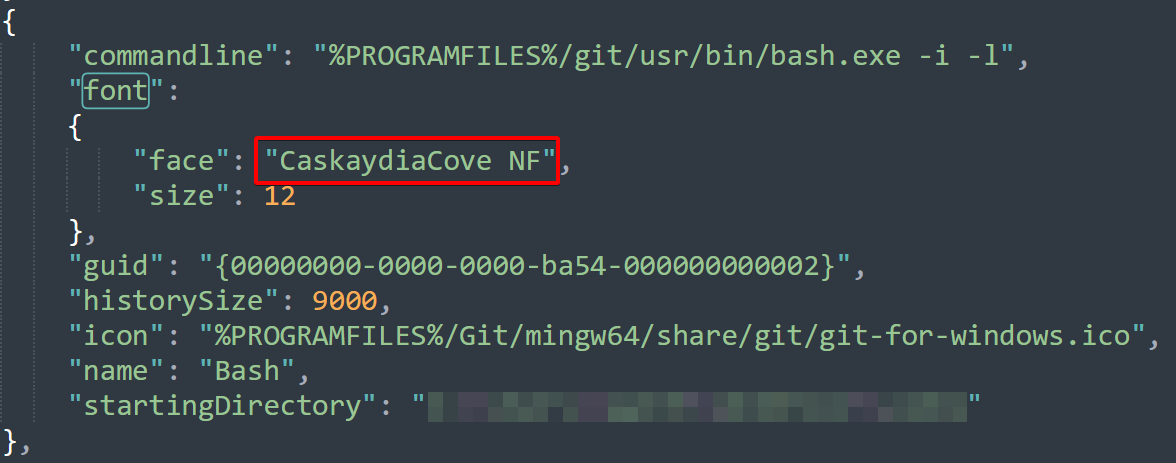

成果

-
在 Windows Terminal 中設定 Git bash 可以參考:Windows Terminal's 設定 Git Bash 和 SSH @ 傑克! 真是太神奇了! :: 痞客邦 :: ↩︎