
171 lines
5.3 KiB
Markdown
171 lines
5.3 KiB
Markdown
---
|
||
title: "安裝新版 Oh My Posh 與插件來美化 PowerShell"
|
||
author:
|
||
- "[[kwchang0831]]"
|
||
tags:
|
||
- "clippings"
|
||
date: "2025-04-11T19:56:45+08:00"
|
||
time: "2025-04-11T19:56:45+08:00"
|
||
description: "本篇文章紀錄 使用 Oh My Posh 來美化 PowerShell 7(pwsh)並安裝一些插件讓開發環境更高效。 插件可以安裝 Posh Git 讓使用 Git 指令的時候有自動完成的功能,或是安裝 ZLocation 讓我們可以更快速地跳到想去的資料夾,等等..."
|
||
source: "https://www.kwchang0831.dev/dev-env/pwsh/oh-my-posh"
|
||
published: 2022-05-22
|
||
---
|
||
[kwchang0831](https://github.com/kwchang0831)
|
||
|
||
更新於2 年前
|
||
|
||
## 開頭
|
||
|
||
[Oh My Posh](https://ohmyposh.dev/) 是一個主題引擎可以美化 PowerShell 7 (pwsh)。
|
||
|
||
本篇文章紀錄 Oh My Posh 的安裝與主題置換來美化你的 pwsh,並可更改主題 (theme)。除此之外,我們還會新增幾個插件來擴充 pwsh 的功能性,進一步提高使用效率。包含指令自動完成,快速切換資料夾等等。
|
||
|
||
本篇文章會介紹以下套件的安裝:
|
||
|
||
- [Oh My Posh](https://ohmyposh.dev/)
|
||
- [Git](https://community.chocolatey.org/packages/git)
|
||
- [Posh-Git](https://github.com/dahlbyk/posh-git)
|
||
- [ZLocation](https://github.com/vors/ZLocation)
|
||
- [NeoFetch](https://github.com/dylanaraps/neofetch)
|
||
|
||
## 環境配置
|
||
|
||
- Windows 10
|
||
- Windows Terminal
|
||
- PowerShell 7
|
||
|
||
## 安裝 gsudo
|
||
|
||
推薦安裝 gsudo ,可以更方便地提升權限到系統管理員權限,
|
||
請參考: [gsudo - 讓 Windows 也有 sudo 功能](https://www.kwchang0831.dev/dev-env/gsudo)
|
||
|
||
## 安裝 PowerShell 7
|
||
|
||
若還沒有安裝最新版的 PowerShell 7 ,
|
||
請參考: [PowerShell 7 - 來安裝最新版的 PowerShell](https://www.kwchang0831.dev/dev-env/pwsh)
|
||
|
||
## 安裝 Windows Terminal
|
||
|
||
若還沒有安裝最新版的 Windows Terminal,
|
||
請參考: [改用 Windows Terminal - 比 Cmder 更好用的現代終端機](https://www.kwchang0831.dev/dev-env/windows-terminal)
|
||
|
||
## 安裝 Git
|
||
|
||
若還沒有安裝 Git ,可以使用 [chocolatey](https://chocolatey.org/install) 來安裝。
|
||
|
||
使用 gsudo 取得一次性系統管理員權限來安裝
|
||
|
||
## 安裝 Oh My Posh
|
||
|
||
pwsh 輸入
|
||
|
||
用文字編輯器編輯 `$Profile`
|
||
|
||
添加以下,儲存後關閉。
|
||
|
||
## $Profile
|
||
|
||
重新開啟 Windows Terminal 後生效,或是輸入以下指令應用修改,
|
||
|
||
## 安裝 Patched 字型
|
||
|
||
為了 Oh My Posh 的主題可以正常顯示字型與圖示,下載以下字型包並安裝:
|
||
|
||
[https://github.com/ryanoasis/nerd-fonts/releases/download/v2.1.0/Meslo.zip](https://github.com/ryanoasis/nerd-fonts/releases/download/v2.1.0/Meslo.zip)
|
||
|
||
或是使用 `oh-my-posh` 來安裝。這邊必須使用 gsudo 取得一次性系統管理員權限來安裝。
|
||
|
||
### 更改字型
|
||
|
||
#### Windows Terminal
|
||
|
||
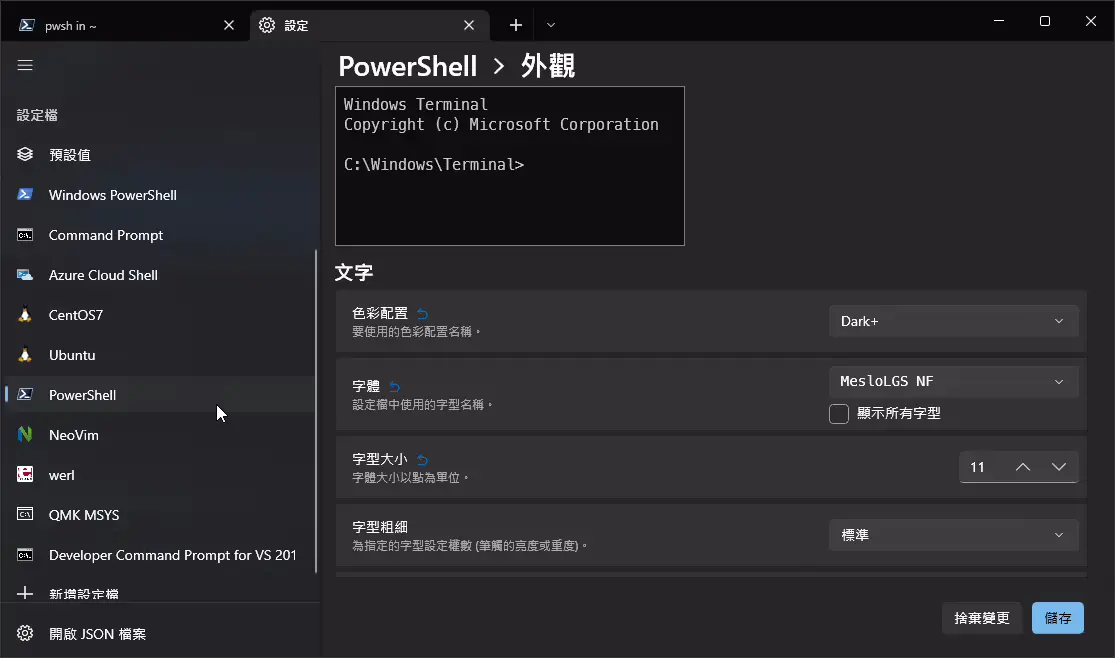
Ctrl +, 打開設定,選擇 PowerShell 7 的設定檔 `外觀 > 字型` ,將字型改成 `MesloLGS NF` 之後儲存。
|
||
|
||
|
||
|
||
#### PowerShell 7
|
||
|
||
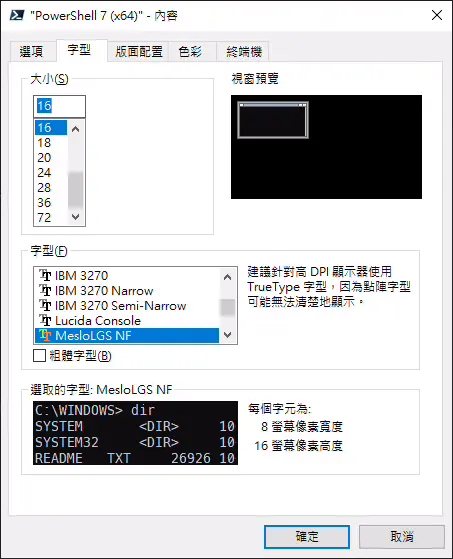
以系統管理員身分執行 PowerShell 7(x64),更改字型為 `MesloLGS NF`
|
||
|
||
|
||
|
||
### 更改 Oh My Posh 主題
|
||
|
||
Oh My Posh 內建很多不同的主題 (theme),請查看 [官網](https://ohmyposh.dev/docs/themes)
|
||
|
||
或是輸入以下指令查看內建的主題與預覽,
|
||
|
||
確定好了主題,讓我們修改 `$Profile` 來設定預設要使用的主題,
|
||
|
||
把 `oh-my-posh init pwsh ...` 的部分後面加上 `--config "$env:POSH_THEMES_PATH\{主題名稱}.omp.json"` 。
|
||
|
||
例如
|
||
|
||
## $Profile
|
||
|
||
重新開啟 Windows Terminal 後生效,或是輸入以下指令應用修改,
|
||
|
||
## posh-git
|
||
|
||
[posh-git](https://github.com/dahlbyk/posh-git) 讓 Git 的指令可已用 Tab 自動完成。
|
||
|
||
pwsh 輸入來安裝
|
||
|
||
在 `$Profile` 檔案最後一行新增以下指令:
|
||
|
||
## ZLocation
|
||
|
||
[ZLocation](https://github.com/vors/ZLocation) 類似於 [autojump](https://github.com/wting/autojump) 或是 [Zsh-z](https://github.com/agkozak/zsh-z) 的插件,
|
||
可以用關鍵字直接跳到想去的資料夾,比使用 `cd` 更快速。
|
||
|
||
1.安裝 ZLocation
|
||
|
||
用 PowerShell 輸入以下指令:
|
||
|
||
輸入 \[A\] Yes to All ,全部同意。
|
||
|
||
2.修改使用者設定
|
||
|
||
在 `$Profile` 檔案最後一行新增以下指令,
|
||
|
||
## $Profile
|
||
|
||
重新開啟 Windows Terminal 後生效,
|
||
或是輸入以下指令應用修改,
|
||
|
||
### ZLocation 使用方式
|
||
|
||
查看已知的資料夾位置
|
||
|
||
進入包含此字串的資料夾,可以用 `Tab` 來選擇結果,如果有多個資料夾符合 doc 的話。
|
||
|
||
回到之前的資料夾
|
||
|
||
## (選用) 安裝 NeoFetch
|
||
|
||
NeoFetch 用來顯示電腦配置。
|
||
|
||
即使已經有安裝 git 了,這邊還是要安裝 git ,因為 neofetch 會直接使用 scoop 安裝的 git 。
|
||
|
||
打開 pwsh 輸入以下指令,
|
||
|
||
執行 NeoFech
|
||
|
||
## (選用) 舊版錯誤訊息
|
||
|
||
如果你看到以下錯誤訊息,
|
||
|
||
表示你過去是用 `Install-Module` 的方式安裝 Oh My Posh,如以下:
|
||
|
||
詳細情況請參考 [官方網站](https://ohmyposh.dev/docs/migrating) 。
|
||
|
||
### 解決辦法
|
||
|
||
刪除過去的版本。打開 pwsh 輸入
|
||
|
||
移除 `$Profile` 裡的 `Import-Module oh-my-posh`
|
||
|
||
然後回到 [最上面的開始](https://www.kwchang0831.dev/dev-env/pwsh/#an1-zhuang1-oh-my-posh) 的流程重新安裝。
|
||
|
||
# 參考來源
|
||
- [安裝新版 Oh My Posh 與插件來美化 PowerShell](https://www.kwchang0831.dev/dev-env/pwsh/oh-my-posh) |